Email deliverability · 6 min read
Klaviyo deliverability checklist: what ecommerce stores should check before peak season
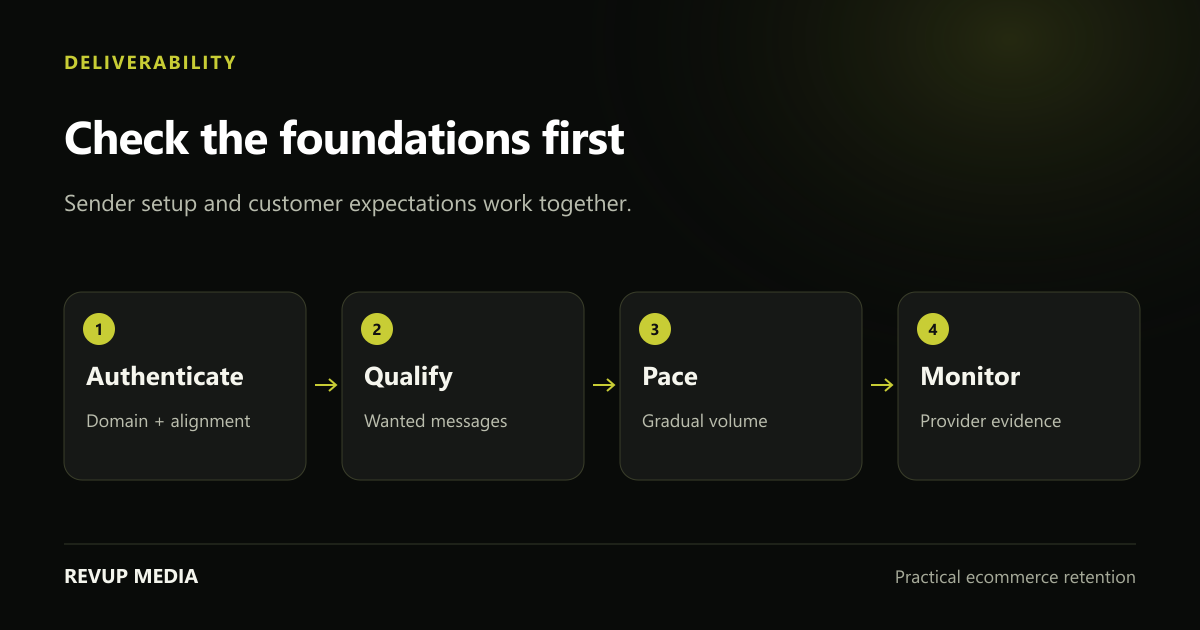
Klaviyo deliverability work is a combination of sender setup, recipient expectations and consistent sending behaviour. Before Black Friday or another volume increase, check the foundations and the evidence of trouble before rewriting every subject line.
Start here
Delivered means the receiving server accepted the message; it does not guarantee inbox placement. Authentication is necessary, but it cannot compensate for unwanted email or an abrupt volume spike.
Verify the sender setup with the person who manages DNS
Confirm the sending domain, From address and authentication configuration using your provider’s current instructions. Review SPF, DKIM and DMARC rather than assuming the setup is correct because messages have sent before. Domain alignment matters as well as the existence of a record.
For bulk traffic to personal Gmail accounts, Google requires SPF, DKIM and DMARC, with a minimum DMARC policy of none, and alignment of the From domain with SPF or DKIM. Requirements also cover infrastructure and unsubscribe support. Consult the current provider guidance for the exact scope and implementation.
Have the responsible domain administrator review changes across all services that send for the brand. Do not paste a generic DNS example into production or overwrite another service’s records. Test a representative message and inspect authentication results after an approved change.
Source and context: Google: email sender guidelines ↗. Google’s current guidelines define authentication and other requirements for personal Gmail recipients. Use the full document and your email provider’s setup process; this article is an operational review checklist, not a replacement for those instructions.
Review who receives email and why they expect it
Document every subscriber source: storefront forms, checkout opt-ins, events, imports and other systems. Confirm the promise and permission attached to each source. A bigger account profile count does not necessarily mean a bigger eligible audience.
Look for poor-quality acquisition patterns such as sudden signups from an unfamiliar source, invalid addresses or a cohort that generates complaints after the first message. Pause the source while investigating if the evidence warrants it. Do not buy lists or treat an old business contact spreadsheet as a seasonal marketing audience.
Define engagement with more than opens. Reliable clicks, purchases and available browsing activity can provide useful context. A quiet recipient may need fewer messages or a carefully designed re-engagement approach; they do not become more interested simply because your sale calendar needs another send.
Increase volume gradually and with a reason
Compare your proposed peak volume against your recent normal volume. A store that has sent rarely should not suddenly contact every stored profile several times a day. Plan expansion from the most engaged eligible audiences and watch receiver feedback as volume changes.
Google recommends consistent sending and gradual increases rather than abrupt bursts. A domain change, new infrastructure or a long pause can affect the plan too. Ask your provider how to handle the specific situation rather than applying a generic warm-up schedule.
Keep the operational goal concrete: reach qualified customers with useful messages while identifying deterioration early. If deferrals, bounces or complaints rise, reduce or pause affected sends and investigate the source. More volume is not a recovery strategy for deteriorating delivery.
Source and context: Klaviyo: warming a sending domain ↗. Klaviyo explains warming considerations and the use of engaged audiences. Follow the current guidance for your account history and infrastructure rather than copying a fixed daily-volume ladder.
Check unsubscribe behaviour and sender clarity
Confirm that marketing messages provide a working, visible unsubscribe option and that suppression is respected across relevant systems. Bulk Gmail requirements include one-click unsubscribe support as well as an in-message link. These are separate checks.
Test the unsubscribe experience with an appropriate test profile. Make sure the recipient does not immediately qualify for another promotional journey because one system has not received the update. Review preference options carefully so they do not make leaving unnecessarily difficult.
Keep sender identity stable and subject lines honest. Do not disguise a promotion as an order problem or a reply. A recipient should recognise the brand and understand why they received the message. Customer expectations and technical authentication work together.
Monitor delivery evidence by provider and acquisition source
A blended campaign average can hide a problem affecting one inbox provider or one subscriber source. Review rejection and bounce information where available, along with complaints, unsubscribes and changes in click activity. Read the actual error information instead of treating every bounce as the same event.
Where eligible and available, use Google Postmaster Tools to review domain and spam information for Gmail traffic. Missing or limited dashboard data is not proof that delivery is healthy. Use the evidence your volume and provider make available.
Keep open rates in context. Google explicitly notes that it does not verify third-party open-rate accuracy, and inbox privacy behaviour can distort the signal. A message accepted by the recipient’s server may still land outside the inbox. Use multiple indicators rather than describing a good open rate as a deliverability guarantee.
| Signal | What to investigate | Avoid concluding |
|---|---|---|
| Provider-specific rejections | Authentication, policy or rate errors | Every provider is affected equally |
| Complaint increase | Acquisition source, relevance and frequency | More sends will fix engagement |
| Clicks decline after volume increase | Audience mix, delivery and creative | The subject line is the only cause |
| Limited Postmaster data | Whether enough traffic is visible | No data means no issue |
Make a pre-peak review repeatable
Create a concise record of the sending domain, authentication review, audience sources, normal volume, planned expansion and response owner. List the conditions that would cause you to stop a scheduled send. Use your normal baseline and provider evidence, not an invented universal safe number.
Review campaign and flow collisions too. The same customer may receive several eligible messages, each reasonable in isolation. Evaluate the combined experience, especially around a sale launch or signup event. A shared calendar can make unnecessary duplication visible.
After the peak, inspect which cohorts stayed engaged and which should receive a lower frequency. Deliverability improves through sustained relevant sending and sound operations. A one-time cleanup or successful authentication check does not finish the work.
- Authentication reviewed against current provider requirements.
- Subscriber sources and channel eligibility documented.
- Sending expansion tied to recent history and engaged audiences.
- Unsubscribe, suppression and response procedures tested.
Common questions
Does a branded sending domain guarantee inbox placement?
No. It supports sender identity and authentication, but audience quality, complaints, infrastructure and sending behaviour also matter.
Can a deliverability problem be fixed by changing subject lines?
Sometimes relevance needs improvement, but first inspect authentication, provider errors, audience sources and volume changes. A subject-line edit will not repair a broken technical setup.
Need a plan for your store?
Turn the next useful idea into action.
We review your campaigns, flows, signup experience and customer journey to identify the work worth doing first.
Book Your Free Audit →Discuss your Klaviyo email program →