Cart recovery · 6 min read
Klaviyo abandoned cart flow: triggers, timing and the checks that prevent wrong sends
An abandoned cart flow should help a qualified shopper resume an interrupted decision. It becomes frustrating when it reminds someone who already bought, shows the wrong products, or sends an offer that cannot be used.
Start here
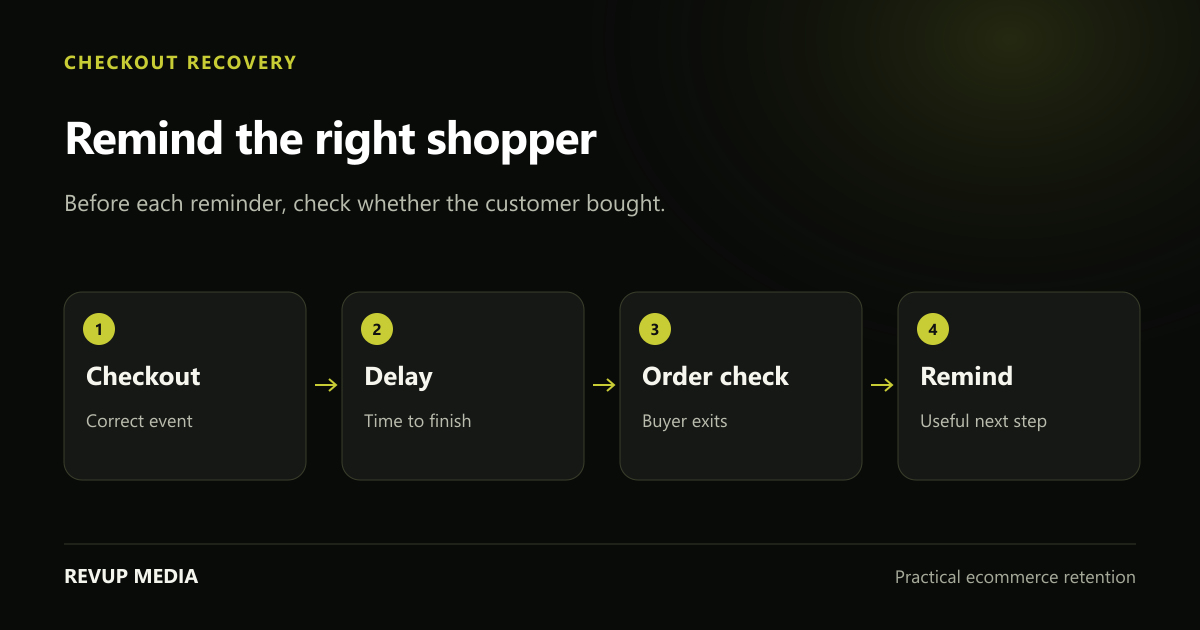
Confirm your exact event before building. Added to Cart and Started Checkout describe different customer actions, and your template, timing and exclusions must match the chosen trigger.
Separate cart interest from checkout intent
Stores often use “abandoned cart” as a broad label, but the trigger matters. A cart event records a product being added. A checkout event records a later action. Check the metrics available through your Shopify or other ecommerce integration rather than assuming the flow name proves what starts it.
Inspect event data from representative profiles. Confirm product names, variants, quantities and any recovery URL the template needs. Check sync timing. If an integration updates less frequently, a very short flow delay may not correspond to the customer experience you imagine.
Inventory reminders already sent by Shopify or other apps. Decide which system owns recovery and how you will verify the handover. Do not disable functioning customer messages until the replacement is tested, but do not knowingly leave duplicate recovery journeys running either.
Create a purchase exit that is checked throughout the flow
The essential question before every reminder is whether the customer has already made the qualifying purchase. Klaviyo’s standard guidance uses a profile filter that requires zero Placed Order events since entering the flow. The exact metric must match the integrated store and order path.
Test this behaviour rather than only reading the filter label. Enter the flow, place an order before a later step and inspect whether the message is skipped for the expected reason. If multiple store integrations or order channels are involved, confirm that the relevant purchases reach the logic.
Also decide how frequently a customer can re-enter. Someone who repeatedly opens checkout should not automatically receive a new full sequence each time. Choose a repeat-entry rule suited to your store and inspect its effect on real eligible profiles.
Source and context: Klaviyo: creating an abandoned cart flow ↗. Klaviyo documents checkout event sync, delays, dynamic products and purchase filters, including the zero-orders-since-entry filter. Match these mechanics to your integration and validate them with a test purchase.
Use timing as a starting hypothesis
Allow time for the customer to complete the purchase normally before sending a recovery message. For an evergreen checkout flow, Klaviyo’s guide discusses a first message roughly two to four hours after checkout and a later follow-up. That is a starting range, not proof of the best timing for your store.
Review product consideration and event latency. A complex purchase may require more time. A short seasonal offer can make earlier clarity useful, but a faster send should still be supported by reliable data and a real customer benefit. Do not accelerate every step simply because the sale is busy.
Keep the initial sequence manageable. Decide whether each additional message answers a new question. Review combined campaign and flow frequency, including SMS where the person is separately eligible. Record seasonal timing changes so they can be restored afterwards.
Build content around the actual unfinished purchase
The first reminder can simply show the selected items, a clear return link and a way to ask for help. Later content can answer an objection: shipping terms, size guidance, compatibility or the returns process. Use the specific information customers ask your support team for.
Keep the product block accurate and focused. Test variants, long names, different quantities and mixed carts. A template preview with a single ideal product is not enough. If a recovery link is unavailable or expired, provide an appropriate fallback instead of sending a broken primary button.
Avoid implying inventory is reserved if it is not. Do not say an item is almost sold out without a current basis for that claim. Clear assistance often provides a better reason to return than invented urgency. A genuine sale ending can be explained precisely when it applies to the items and recipient.
| Message purpose | Useful content | Check before sending |
|---|---|---|
| Reminder | Selected products and return-to-checkout link | Correct cart data and destination |
| Decision support | Fit, shipping, use or returns information | Accurate policy and product context |
| Eligible incentive | An approved offer with exact terms | Margin, stacking, expiry and customer eligibility |
Decide whether a discount is actually needed
A discount should solve a commercial problem, not be the default response to every interrupted checkout. Some shoppers were distracted, checking delivery costs or comparing options. Offering a reduction immediately can reward behaviour that did not require one.
If you test an incentive, define eligibility and evaluate the margin after it. Consider customer status, product economics and overlap with public offers. An existing sale may already provide the relevant benefit. Make terms easy to understand and avoid telling a customer to use an incompatible code.
Compare recovery performance across the whole flow and the store. Attributed orders are useful evidence, but some customers would have returned without the email. If volume supports it, a controlled holdout can help estimate the added effect. At a minimum, do not describe attributed revenue as guaranteed incremental profit.
Diagnose the flow in the order the customer experiences it
When results disappoint, check entry and data first. Are qualified checkout events appearing? Are customers skipped for a valid purchase exit? Are messages delivered? A design change cannot repair a missing event or an incorrect exclusion.
Then inspect the message and landing experience. A high click count with few orders can point toward unexpected shipping, a poor mobile cart, unavailable items or an offer mismatch. Ask support whether people are reporting a recurring checkout issue.
Keep a review sheet with the event, filters, delays, templates, destinations and last test date. After a platform, offer or checkout change, repeat the checks that could be affected. This makes cart recovery an operational system you can trust rather than an automation you hope is still working.
- Verify event sync and customer identity.
- Confirm order exits and repeat-entry behaviour.
- Preview products, recovery links and discount rules.
- Check mobile checkout and the customer’s combined message frequency.
Common questions
Why do customers receive abandoned cart emails after purchasing?
Investigate order-event sync, the selected purchase metric and the profile filter. The flow should check qualifying purchases before later messages; a test order can show whether the intended exit works.
Should the first cart recovery email include a discount?
Not automatically. Start by helping the customer resume and resolving uncertainty. Test an approved incentive only when eligibility and contribution margin justify it.
Need a plan for your store?
Turn the next useful idea into action.
We review your campaigns, flows, signup experience and customer journey to identify the work worth doing first.
Book Your Free Audit →Get help with ecommerce automation flows →